
How to guides
Before you start, you will need your membership number. All members should have received an e-mail with this on Friday 20th March. If you didn't, please contact the centre on Inverclyde.Enquiries@sportscotland.org.uk for this information.
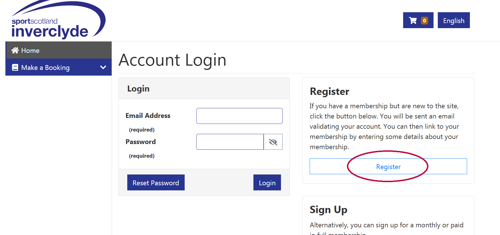
1. Existing members should register for their online account via the following link: | |
2. Click the Register button |
|
|---|---|
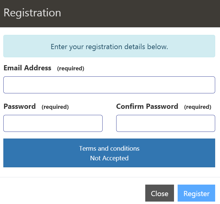
3. Enter your e-mail address and create a password. |
|
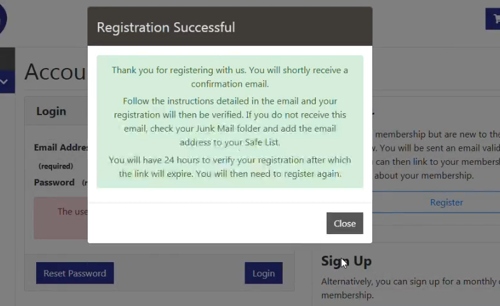
4. You'll now receive an e-mail to verify your account. Click on the link within the email and enter the password you set up in step 3. |
|
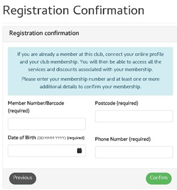
5. The system will then ask you some personal details to verify your identity. Including: Membership number, postcode, date of birth and phone number. It is important you use the information we have on record for you. |
|
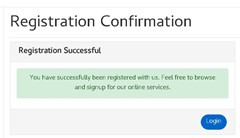
6. You'll see a confirmation screen that your account has been successfully set-up and receive an e-mail too. |
|
7. Download the app |
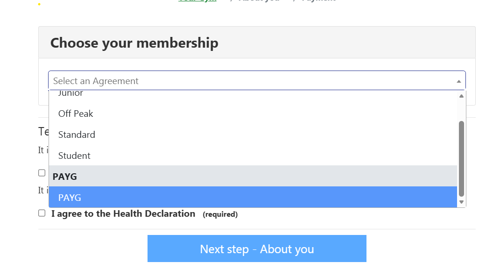
Our fitness classes are available on a Pay as you Go Basis (PAYG). To do this you'll need to set up an online account following the steps below.
1. New PAYG customers should set up their online account using the following link: | |
2. Select the PAYG option from the drop down. | |
|---|---|
3. Follow the steps to complete your PAYG registration. You will now be able to book fitness classes. | |
4. Download our App |
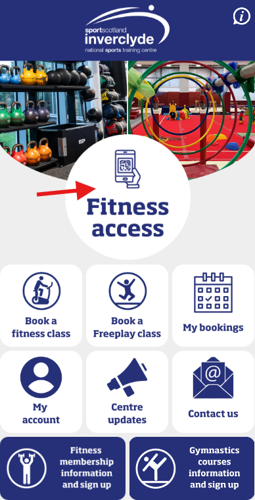
When you arrive at the Fitness suite gate, open the app and press the 'Fitness access' button.
1. When you arrive at the Fitness suite gate, open the app and press the 'Fitness access' button. |
|
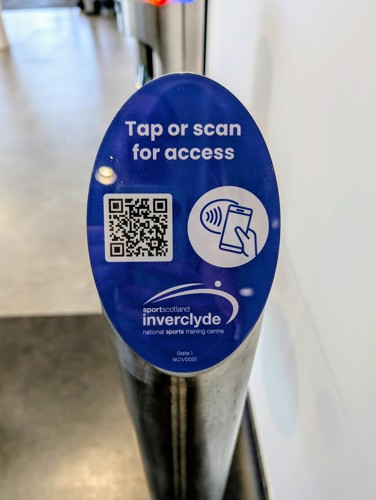
2. Tap or scan the reader for access | |
|---|
A guide for Android users:
A guide for iphone users:
A short delay of up to 5 seconds is to be expected when scanning your phone for entry into the fitness suite. This is for security reasons to allow the system that you have a valid membership for the fitness suite.
To minimise this delay we encourage members to ensure they are connected to the centre's WIFI network. The details for this are:
Network: SSC-Guest
Password: #SportForLife
If you are connected to the centre's WIFI and still experience a delay longer than 5 seconds, please speak to a member of staff that will help troubleshoot the problem.
Please note, if entering the fitness suite behind someone, you do not need to wait for the gate to close before you scan for entry. As this video shows.
Members are reminded not to jump the gate at the Fitness Suite to gain entry for any reason. Doing so will result in immediate termination of fitness membership.
Our app can only be logged into one device per membership at a time. If you get a new device, or delete and then reinstall our app, you will need to visit reception to register your new device. This takes a few seconds to do and is a security requirement of the new system.